
Let me ask you something...
How often do you look at your catering numbers and think, "Well, we were busy... but were we profitable?"
If you're anything like I was back in the day, you don't have time to babysit spreadsheets or play detective. You're too busy putting out fires, feeding clients, and trying to remember where you put your car keys.
That’s why I built CaterZen's catering software, to be your right hand when it comes to understanding what’s actually moving the needle in your catering business.
Recently in our blog, we've been showing you how to use CaterZen's built-in reporting tools. This post builds on that foundation with a few extra calculations and power-user tips to help you dig deeper into your data and grow your catering business faster.
Let’s dig in.
1. Total Sales & Trends Over Time
🎯 KPI: Are your sales headed up, down, or stuck in neutral?
Where to find it: Sales Trend Chart Report
Why it matters: Trends tell you when to push harder or pump the brakes. See a slump? Maybe it’s time to fire up a promo. Hitting record numbers? Double down and ride that wave.
Action Step:
- Run the report monthly or quarterly.
- Compare to the same period last year.
- Plan promos or staffing based on busy/slow seasons.
Bonus Calculation: Month-Over-Month Growth.
Want to know how your sales are really trending? Run the Sales Trend Chart and calculate the growth % between months:
((Current Month - Previous Month) ÷ Previous Month) x 100
Example: From October to November, if sales grew from $11,639.95 to $13,702.49, your growth = +17.72%. From November to December, the growth was +18.46%. Seeing this kind of sustained momentum can give you the confidence to increase ad spend, hire more drivers, or start targeting higher-value clients.

2. Event Type Breakdown
🎯 KPI: What events are lining your pockets?
Where to find it: Sales by Event Type Report
Why it matters: Not all catering jobs are created equal. A corporate lunch might net you $500. A wedding? $5,000. This report helps you fish where the big fish swim.
Action Step:
- Focus sales efforts on high-profit event types.
- Ditch or rework the ones that waste your time.
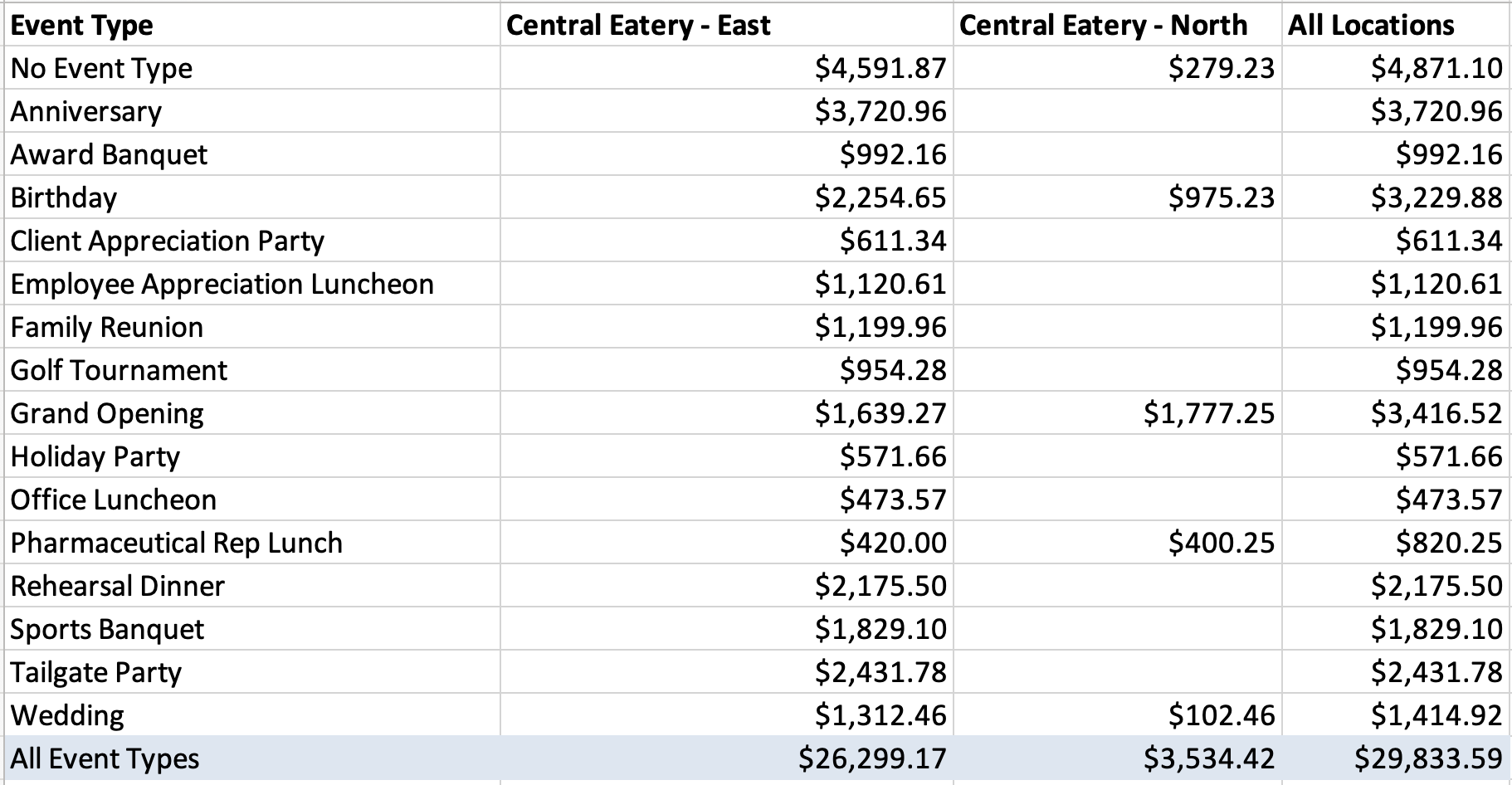
Bonus Calculation: Revenue Per Event Type
When you combine data from different reports, your insights get even more powerful. In this case, you'll need to download the Order List Report to count how many orders were placed per event type:
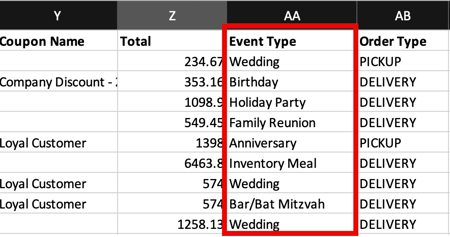
Then match that to revenue from the Sales by Event Type Report.
Total Revenue (per event) ÷ Total Events (per event) = Avg. Revenue (per Event)
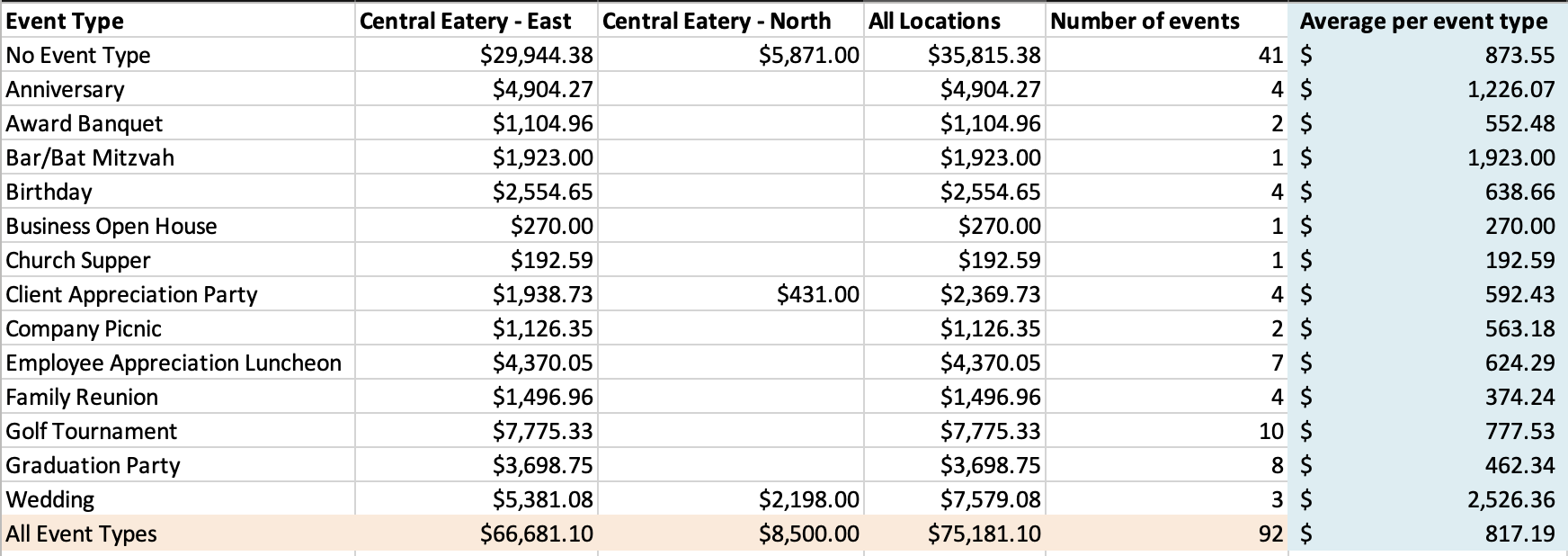
Example: If Corporate Lunches brought in $12,000 over 30 orders, your average revenue per event is $400. If Weddings brought in $18,000 from just 3 events, that’s $6,000 each. You now know where to fish.
⚠️ Note: We know this takes a few steps today. That’s why we’re working on a new Build-Your-Own Report tool - so you can mix and match data from multiple reports without needing Excel.
3. Top-Selling Menu Items
🎯 KPI: What dishes are your cash cows?
Where to find it: PLU Sales Report
Why it matters: This is menu engineering gold. Find your all-stars. Adjust pricing. Pull underperformers. It's like Moneyball... but for meatballs.
Action Step:
- Highlight top sellers in proposals.
- Use this data to plan inventory and upsells.
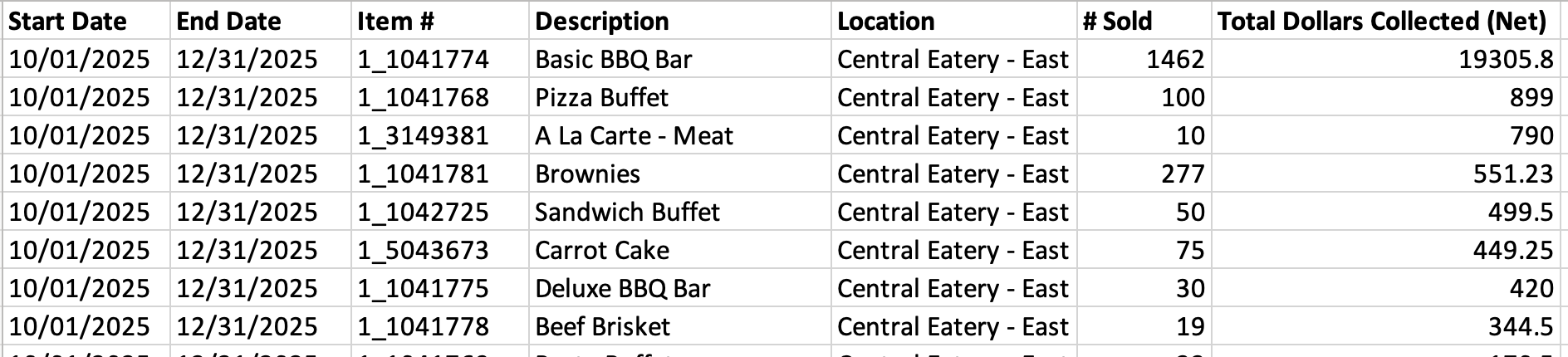
Pro Tip
Combine this report with Event Type to see which menu items shine where (e.g. brisket kills it for weddings, but wraps rule the lunch game).
4. Coupon and Discount ROI
🎯 KPI: Are your promos bringing in profits or just cheaper orders?
Where to find it: Coupon Usage Report
Why it matters: Discounting without data is a quick trip to broke. This tells you if those 10% off offers are worth it.
Action Step:
- Track redemptions AND average order values.
- Kill coupons that hurt margins.
Advanced Move
Track total coupon revenue vs. same period last year without coupon use. Did it lift or just discount regulars?

5. Sales by Rep
🎯 KPI: Who on your team deserves a high five (or a kick in the pants)?
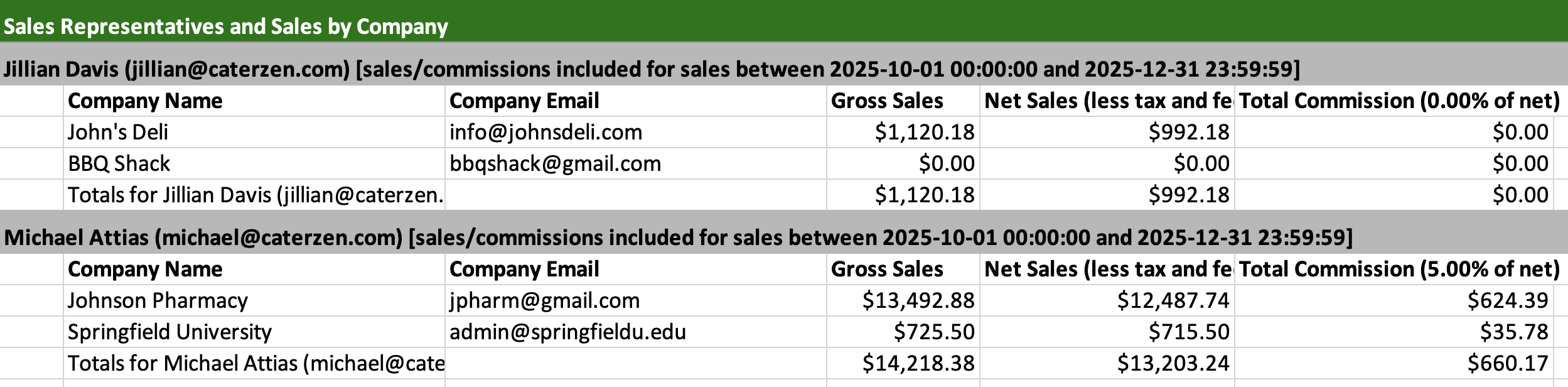
Where to find it: Companies by Sales Rep Report
Why it matters: You can’t grow what you don’t track. Knowing who’s closing deals helps you coach your team or reward your rockstars.
Action Step:
- Review weekly or monthly.
- Use to run sales contests or set benchmarks.
6. Quote-to-Close Rate
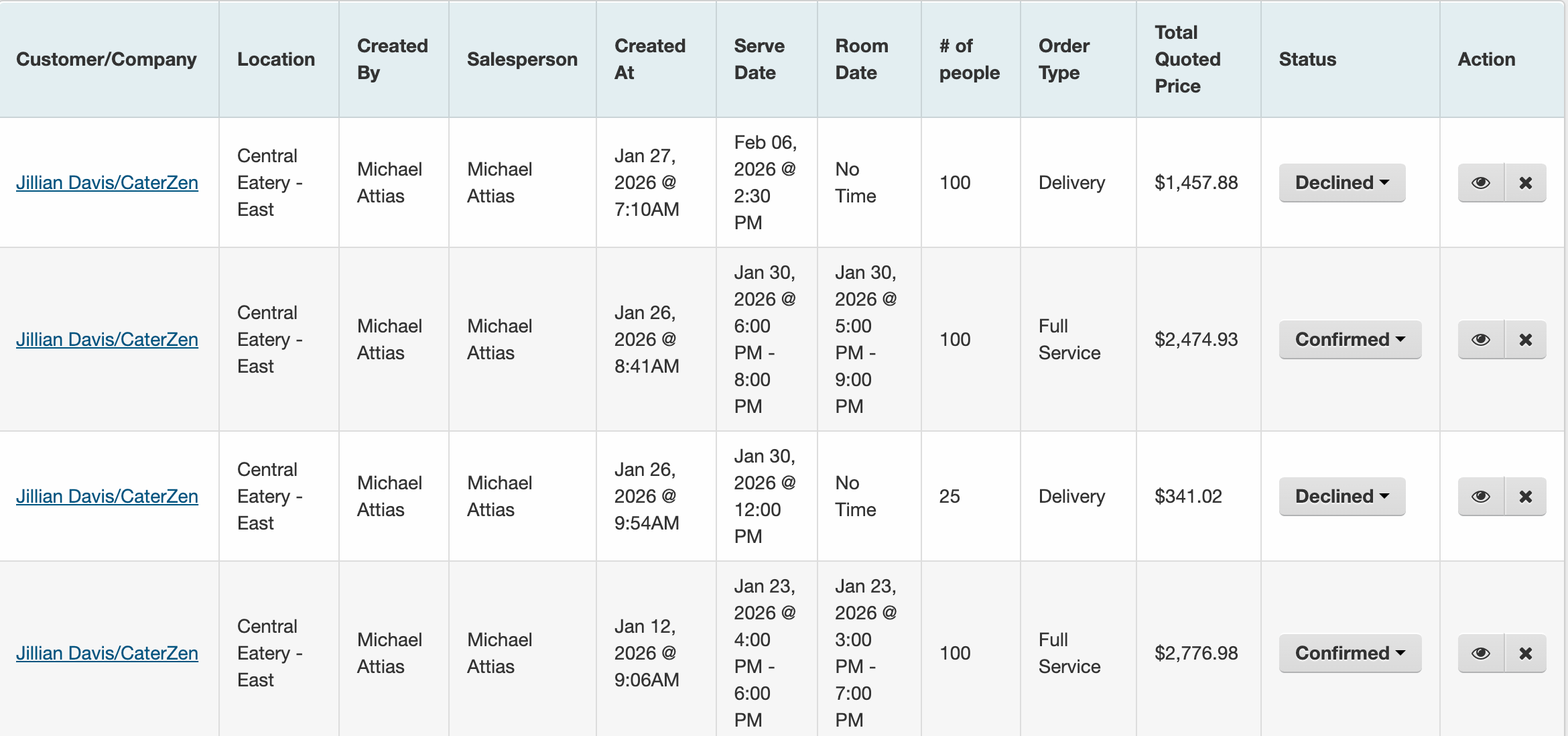
🎯 KPI: Are your quotes converting into paid catering gigs?
Where to find it: Quote Report + Order Conversion
How to calculate: Orders ÷ Total Quotes = Conversion Rate
Less than 30%? It's time to improve your proposals or follow-up game. Add photos, FAQs, or better upsell options.
7. Customer Lifetime Value (CLTV)
🎯 KPI: What is a long-term client actually worth?
Where to start: Order History by Client (export to CSV)
How to calculate:
- Add up the total lifetime sales for a customer.
- Divide by the number of years they've been a client.
This gives you a realistic estimate of annual value and long-term worth. If someone spends $2,000/year and you’ve had them for 4 years, their lifetime value is $8,000. That gives you a strong benchmark for retention efforts.
8. Niche Performance by CRM Tags
🎯KPI: Which types of clients are driving the most revenue?
Where to start: Use CRM Groups (e.g. churches, schools, law firms)
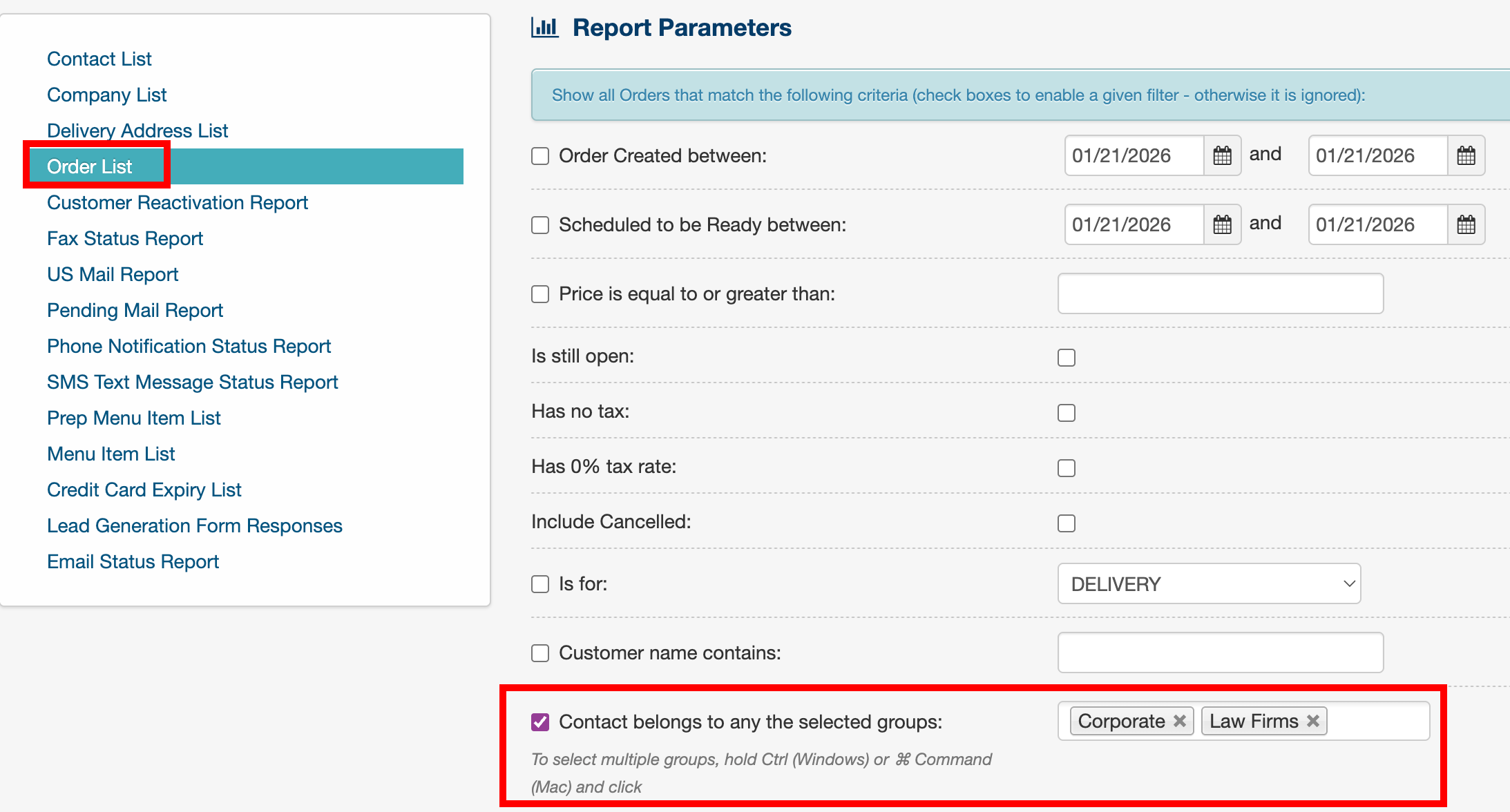
Action Step:
- Tag clients.
- Run sales reports filtered by group.
- Compare performance by niche.
This helps you double down on niches that pay off. It’s also gold for reactivation campaigns.
Wrapping It Up
CaterZen isn’t just a system to spit out invoices and schedules. It’s your profit dashboard. These KPIs and calculations will give you the visibility to make smarter moves faster.
And here's the real kicker: You don't need to be a spreadsheet nerd to pull this off. Just a few clicks in CaterZen, and you're looking at the truth about your business on a silver platter.
So what are you waiting for?
Log in. Run a report. Find your gold.
Let the data drive your dollars.
Need help pulling these reports? Our support team has your back. Or just visit the "Reports" in your dashboard and start digging.
Want help putting these strategies into action?
- 👉 Take a free trial of CaterZen and start exploring your sales data today.
- 👉 Book a personalized demo to see how CaterZen can help you track, measure, and grow your catering business.
You might be surprised what you find hiding in plain sight.