
Quick question: who was your best customer two years ago, and when did they last order from you?
If you had to dig through a spreadsheet to answer that, this post is for you.
Let me tell you something. Most catering operators are sitting on a pile of money they already earned the hard way. Customers who ordered, loved the food, paid the invoice… and then quietly drifted off. Nobody called. Nobody followed up. Nobody noticed.
When I ran my restaurant, I kept a tickler file for this. Nothing fancy. A folder marked January through December. Close a holiday party, mark the ticket to call the decision maker next year, and drop it in the right month.
Here's the part most people miss. I didn't set the reminder for the day I booked the event. Say you locked in a holiday party on September 30th, but the conversation actually started August 15th. The reminder goes on August 1st of the following year. You call before the planning starts, not after somebody else has won it.
Why bother? Because customers don't automatically rebook. A new person takes over the event. A competitor gets to your contact first. Stuff happens.
But here's the problem with a folder. It only works for events you remembered to file. What about everybody else? The customers who ordered a few times and went quiet?
Most operators find out the hard way. One day the light bulb goes off: "Hey, it's been a while since so-and-so ordered." That's usually two to six months later. It may be too late.
Nothing replaces selling. But you can't sell to people you can't find.
The Blunt Truth About Your Customer List
You already have the data. Who orders, how often, how much they spend, what they order. It's all sitting in your account.
The problem is getting it out fast enough to use it. Export, sort, filter, squint, and by the time you're done, the list is stale. So it doesn't get done. Cold calling sucks, sure, but calling people who already love your food is a different sport entirely.
Build the List Once. Reuse It Forever.
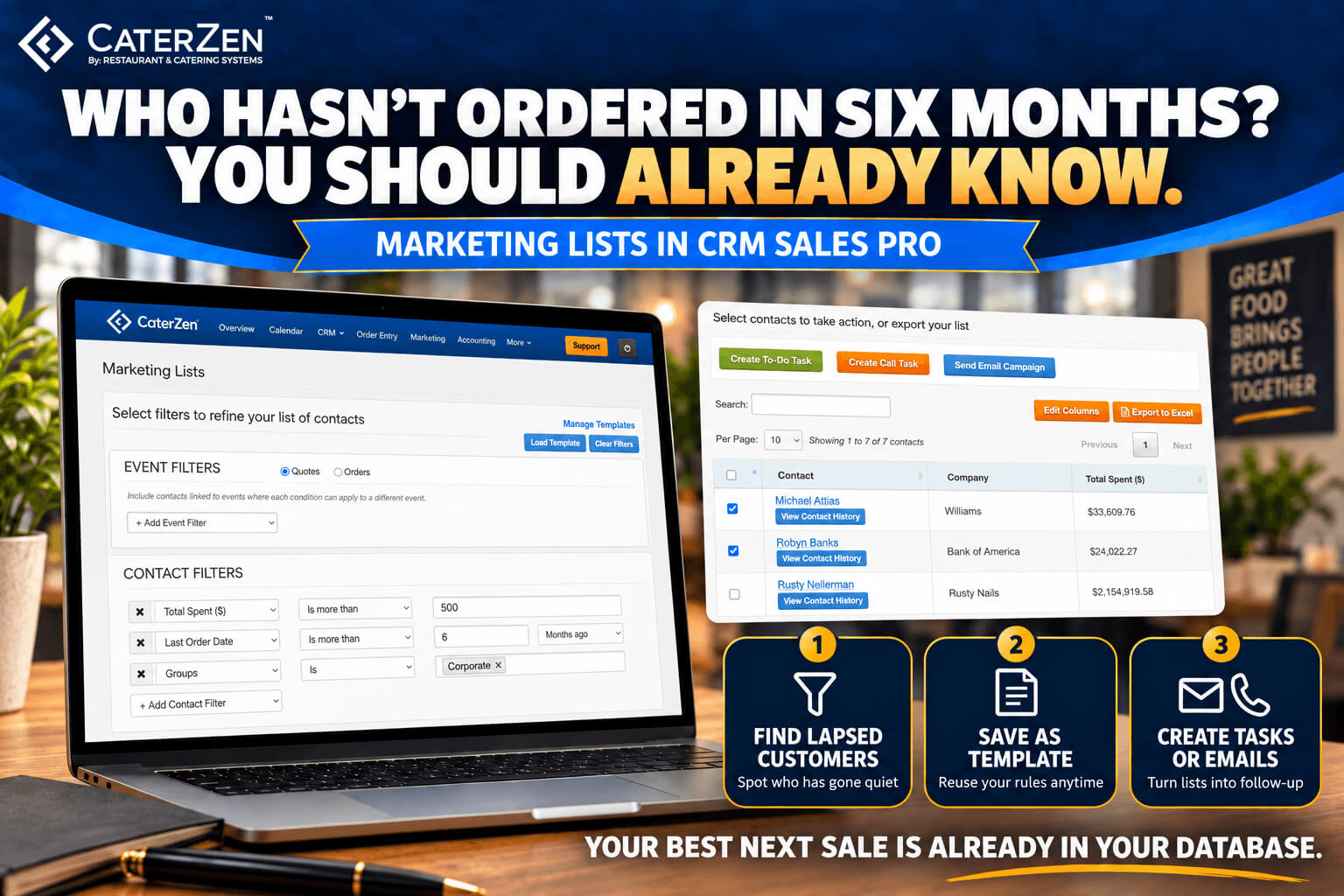
That's what Marketing Lists in CaterZen is for. You stack filters, and each one reads like a plain sentence:
- "Total Spent is greater than $2,000."
- "Primary Location is Downtown."
- "Most Recent Order is before [the date you pick]."
.jpg?width=2090&height=1552&name=marketing-list%20(1).jpg)
You can filter on contact details, company details, order and quote details, and even how people answered your lead forms. Every rule you add narrows the list, because a customer has to match all of them to show up.
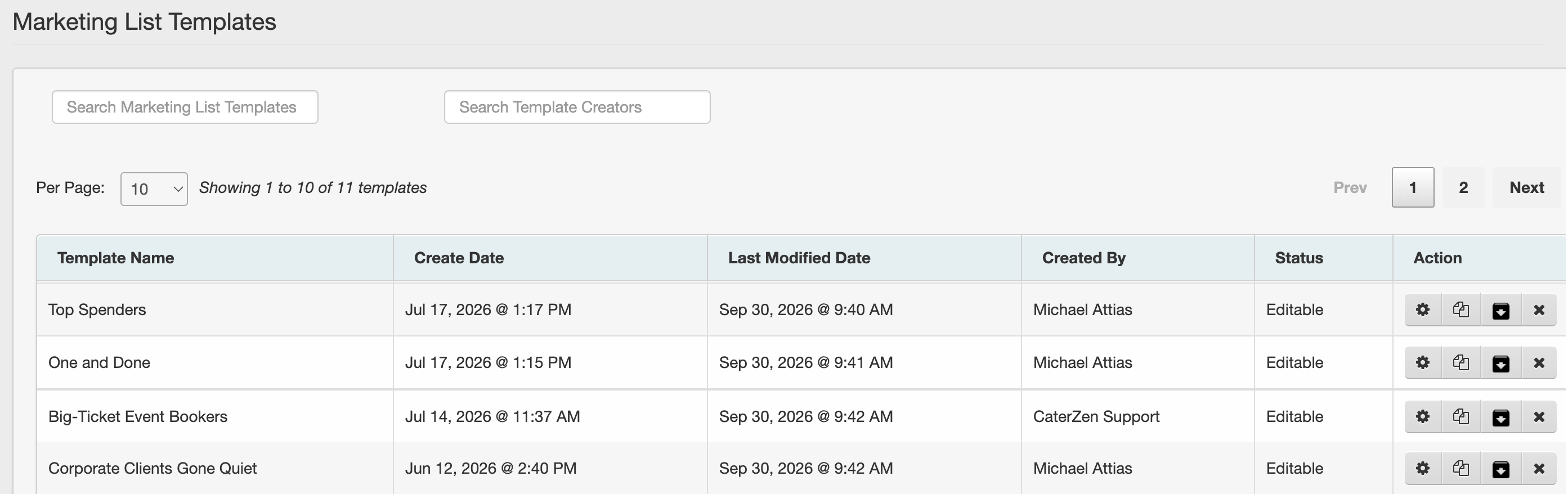
Then click Save as Template. A template saves your rules, not a frozen list of names, so every time you run it you see whoever matches today. One catch: rules that use a date keep the date you picked when you saved. Check it before you run the list again.
Six Lists to Build Today
Change the amounts and dates to fit your business.
1. Top Spenders. Total Spent is at least your VIP number, say $5,000. These people get a personal thank-you. Not a coupon. A thank-you.
2. Lapsed Big Spenders. Total Spent is at least $2,500, and Most Recent Order is before six months ago. Big customers gone quiet. This is a phone call, not an email.
3. One and Done. Orders To Date equals 1, and Most Recent Order is before 60 days ago. Ask how the first order went. You'll learn something either way.
4. Big-Ticket Event Bookers. Switch to Orders, then Order Subtotal is at least $2,500. It looks at each order on its own, so a customer shows up because of one big event, not a bunch of small ones.
5. Signature Item Buyers. Switch to Orders, pick your menu item (holiday turkeys, Easter hams, whatever you sell seasonally) and the date range of last season. Email them the day this year's ordering opens.
6. Corporate Clients Gone Quiet. Group is Corporate, and Most Recent Order is before four months ago. Corporate accounts tend to order on a rhythm. If yours usually book once a quarter, four months of silence is your cue to pick up the phone. Want to reach the whole group instead? Drop the date rule, filter on the group alone, and send them your next email campaign.
A List Nobody Works Is Just a Spreadsheet
Here's where it pays off. Tick the customers you want and choose an action:
- Create Call Task. One task per contact, assigned to the team member you choose, with a due date.
- Create To-Do Task. For follow-up that isn't a call, like dropping off a sample or sending a tailored menu.
- Send Email Campaign. Send or queue it right from the list.
And no more three calls from three different people. You can skip anyone who already had a task, or was sent a campaign, within the window you set.
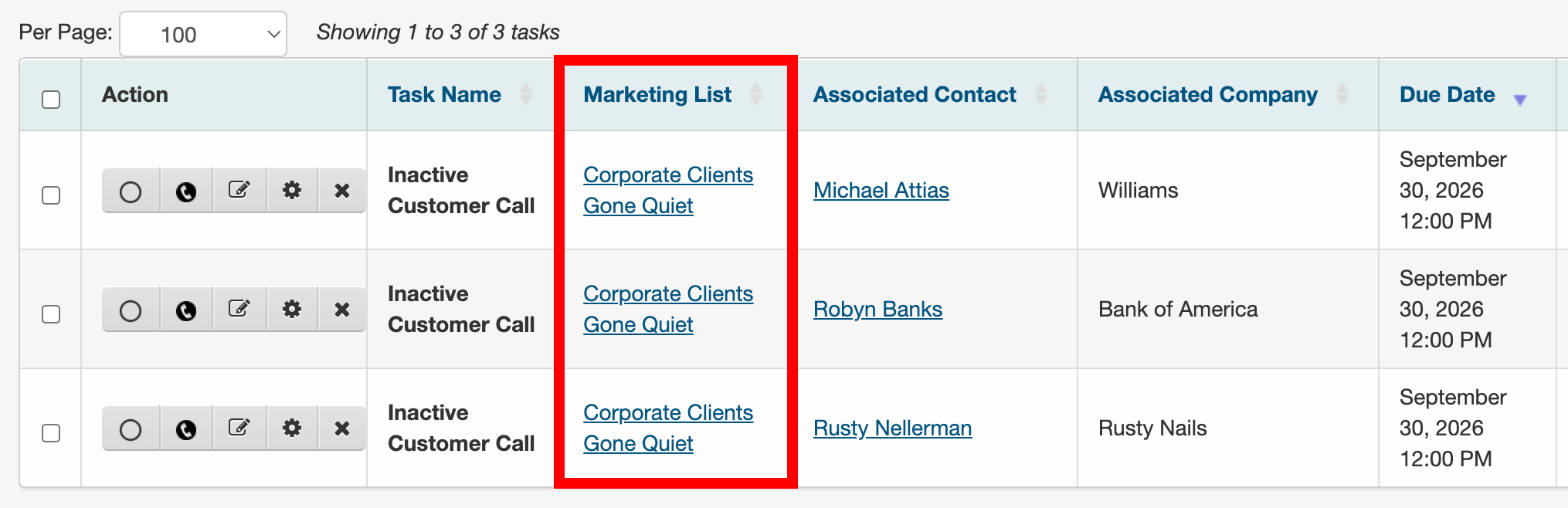
Every task stays tied to its list. Filter your Task List by Marketing List, add "due today," and each rep sees exactly which "Corporate Clients Gone Quiet" calls are theirs.
Before anyone dials, View Contact History shows what's already happened with that customer.
Coming Soon: Put the Follow-up on a Schedule
Marketing Lists tells you who to reach. Today, you follow up with a one-time email campaign or a batch of tasks.
In an upcoming CRM Sales Pro update, Sequences add the plan. A Sequence is a series of steps, like an email, then a call task three days later, then another email a week after that. Build one, then enroll the customers you selected from a Marketing List. Start them right away or on a future date, and CaterZen takes each contact through the steps on schedule.
A few ways you might use it (with some example steps):
- Lapsed Big Spenders. A friendly check-in email, a call task three days later, and a follow-up email a week after that. One email is easy to ignore. The call is where the relationship comes back. And nobody has to remember "day three."
- One and Done. An email asking how the first order went, a call task a few days later, then an email with your menu. The real money isn't in the first order, it's in the second. This is how you go get it.
- Signature Item Buyers. An email the day this year's ordering opens, then a reminder email a week later for the people who didn't respond.
Sequences aren't live yet, so consider this a preview. We'll share a walkthrough as they get closer.
Could You Do This Without Software?
Sure. Export, sort, build a call sheet, assign it, track it, remember who you already called. You can do this manually… but why?
CaterZen just makes it simple. The list is live, the tasks are assigned, and nothing falls through the cracks.
What You Need to Get Started
Marketing Lists is part of CRM Sales Pro. Sales Pro is priced by location, and when it's turned on, it's on for all of your locations. From there, you choose which team members get Sales Pro access, so they can use Sales Pro features like Marketing Lists. Not everyone on your staff needs one.
Not on Sales Pro yet? You can still open Marketing Lists and play with the filters to see what's possible. But the results stay blurred until you upgrade, and you'll need to upgrade to save and use your lists. Same goes for any team member who doesn't have a seat.
Start With One List
Don't build all six. Build the one you already wish you had: customers who used to order regularly and have gone quiet. Save it as a template. Create call tasks for the ones worth a personal touch.
Then see who picks up.
Your Best Next Sale Is Already in Your Database
Marketing Lists won't fix a weak menu or bad service. But the people who already know your food are the easiest customers you'll ever sell to, and now you know exactly who they are.
Already a customer and want a hand setting up your first list? Book a Demo, and we'll walk you through it live.
Not on CaterZen yet? Start a Free Trial and get the ordering platform and customer history this whole post depends on.