.jpg?width=1731&height=912&name=catering-kds-tablet-report-updates%20(1).jpg "catering kds tablet report updates")

You know what's worse than losing a catering customer to a competitor?
Losing them because your kitchen missed a special instruction. Or forgot to prep a custom item someone ordered. Or sent out a half-assembled order because nobody knew it wasn't done yet.
That's not a marketing problem. That's a systems problem.
And the solution isn't yelling louder at your kitchen staff. It's giving them the right information, in the right place, at the right time.
We Built This for Catering Kitchens. Now We're Taking It Further.
Most kitchen display systems were built for fast food. Show the ticket. Bump the ticket. Next ticket.
That's not how catering kitchens work.
Catering kitchens need to know the total of everything they're producing across every order for the day. They need to break it down by category and station. They need to track prep quantities, not just order sequences.
So we built something different.
The CaterZen Tablet Production Report is a Catering KDS - a Kitchen Display System designed from the ground up for catering production. It combines your food prep quantities and your kitchen production workflow into a single real-time display, running on a tablet mounted in your kitchen. Orders pull up in yellow. Your team checks off items as they're completed and they turn green. A new order comes in mid-day? It flashes red, the totals update automatically, and nobody gets caught off guard.
It takes the old paper production report and puts it on steroids.
We've been building on that foundation ever since. And now we're taking it to the next level. We just shipped three new features to the Tablet Production Report - and every one of them is designed around the same principle: nothing should fall through the cracks between your kitchen and your customer's door.
Here's what's new.
Feature #1: Know What's Prepped, What's Assembled, and What Still Needs to Move
The original Tablet Production Report used two colors. Yellow meant not done. Green meant done.
Simple. Clean. And for a lot of kitchens, still exactly what you need.
But here's the problem for bigger operations: "done" is doing a lot of work in that sentence.
Is it done because the food is cooked and sitting on the line? Or is it done because it's been portioned, packaged, labeled, and ready to go out the door?
Those are two very different things. And if your prep team and your packaging team are different people - or even different shifts - that gap is where orders get dropped.
The new 3-color prep tracking system adds a middle stage.
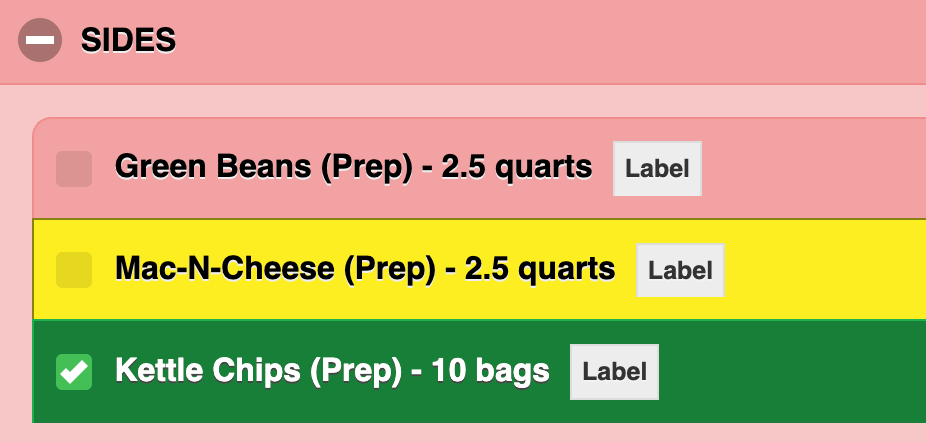
Pink means it hasn't been touched yet. Yellow means it's been prepped - cooked, made, ready. Green means it's been assembled, packaged, and done.
Think about brownie trays on a big catering day.
You've got five trays to make - 20, 25, and 30 portions across multiple orders. Your prep person makes them, labels them, and puts them in the cooler. Pink turns yellow. That means: this has been prepped and it's waiting - in the fridge, in the warming drawer, wherever it lives until it's time to box.
Now your packaging person comes in. They pull the trays, assemble everything for each order, and box it up ready for the driver or the client to walk out the door with. Yellow turns green. That means: this order is fully packaged and done.
For some operations, the same person does both - they prep it, box it, and click through all three stages themselves. Simple.
For others, prep and packaging are two different people, maybe two different shifts. That yellow stage is the handoff. The prep team's job is to get everything to yellow. The packaging team's job is to take it home to green. Everyone knows exactly where things stand without asking, without hunting, without a paper list that's already out of date.
Pink: I need to prep this. Yellow: it's prepped and waiting. Green: it's boxed and out the door.
Three stages. Every item accounted for, from the kitchen to the door.
This feature is optional. Your existing 2-color setup stays exactly as it is unless you choose to enable it.
Note: Like all Tablet Production Report features, this requires formulas to be configured in CaterZen. Haven't done that yet, or want help getting your formula categories set up to match your kitchen workflow? You can schedule a production report session here.
Feature #2: Special Instructions Where Your Kitchen Can Actually See Them
Here's a scenario every catering operation has lived through.
A customer orders the Chocolate Log. Special instruction: Serve from frozen. That note lives in the order entry system, and the catering coordinator who took the order is aware of it.
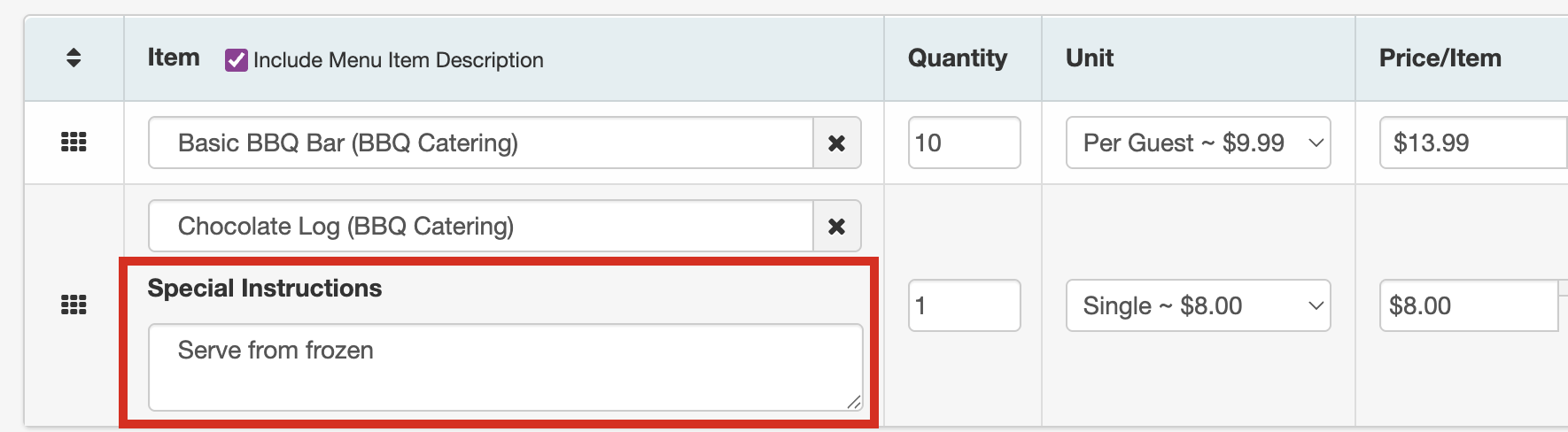
Your kitchen staff? They're working off the Tablet Production Report - and until now, that note was invisible to them.
The new SI button fixes that.
Every prep item in the Catering KDS that has a special instruction attached to it now shows a small "SI" button next to it. Your team taps it, and a popup shows them exactly what the customer specified.

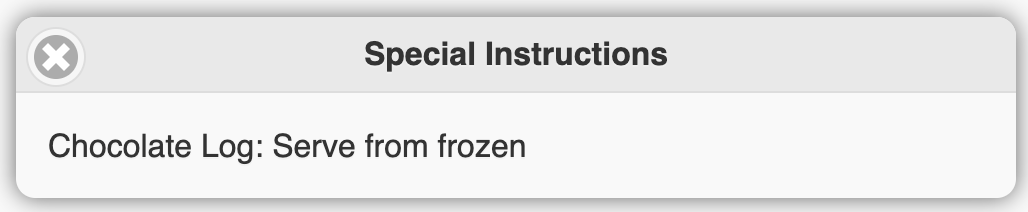
No hunting through the admin panel. No asking the front of the house. No hoping someone remembered to mention it at the morning huddle.
The note is right there, exactly where your team needs it - next to the prep item they're working on.
This matters most for the items where a mistake is hardest to fix. Gluten-free preparation needed. No onions. Keep sauce on the side. These aren't preferences. They're the kind of instructions that determine whether a customer reorders - or doesn't.
Feature #3: Stop Flying Blind on Custom Items
The totals section at the bottom of the Tablet Production Report is how your kitchen knows how much of everything to produce in bulk. Forty dinner rolls. Twelve pounds of brisket. Twenty portions of mac and cheese.
There was a gap, though.
If an order included an open or custom menu item - something not tied to a standard formula category - that item wasn't showing up in the totals. Your kitchen could see it under the individual order, but when they were looking at the bulk production numbers for the day, it was simply missing.
That's fixed. Open menu items now have their own dedicated section in the totals. If any orders for the day include them, they show up there - aggregated, trackable, and checkable.
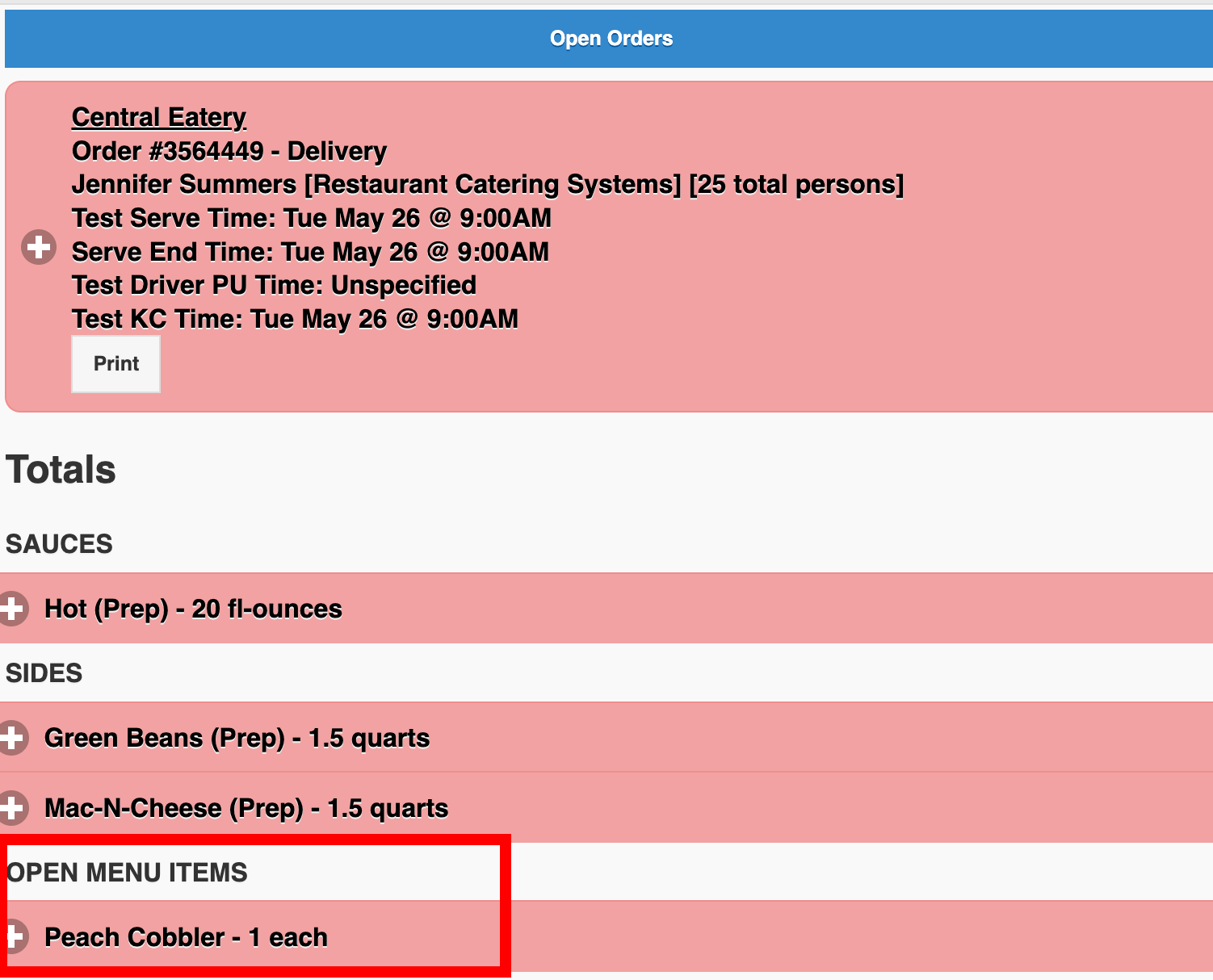
If your kitchen uses custom items at all, this one matters. A missed custom item is the kind of thing you don't catch until it's not in the bag at delivery time.
From Prep to Out the Door
These three features are about the same thing: making the full production workflow visible right on your Catering KDS, from the moment your team starts prepping to the moment the last container is assembled and ready.
The Tablet Production Report closes out the kitchen's job. From there, your driver's delivery app handles its own per-item checklist on the delivery end. Two tools, one system - nothing dropped between your kitchen and your customer's door.
Ready to Turn These On?
All three features are live in your account right now.
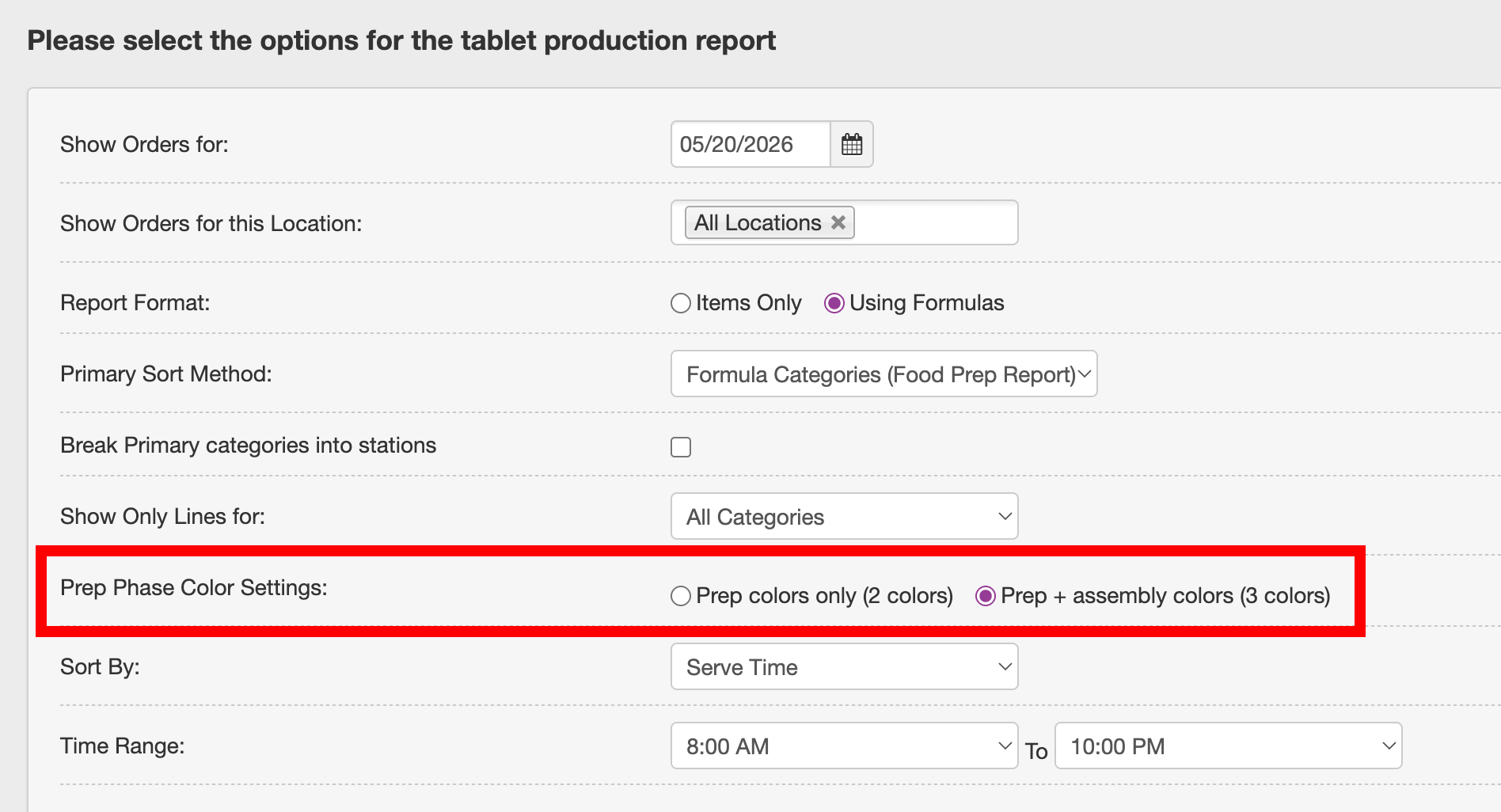
To enable the 3-color prep tracking in your CaterZen account, visit the More option in the top menu, and go to Reports → Tablet Production Report → Prep Phase Color Settings.
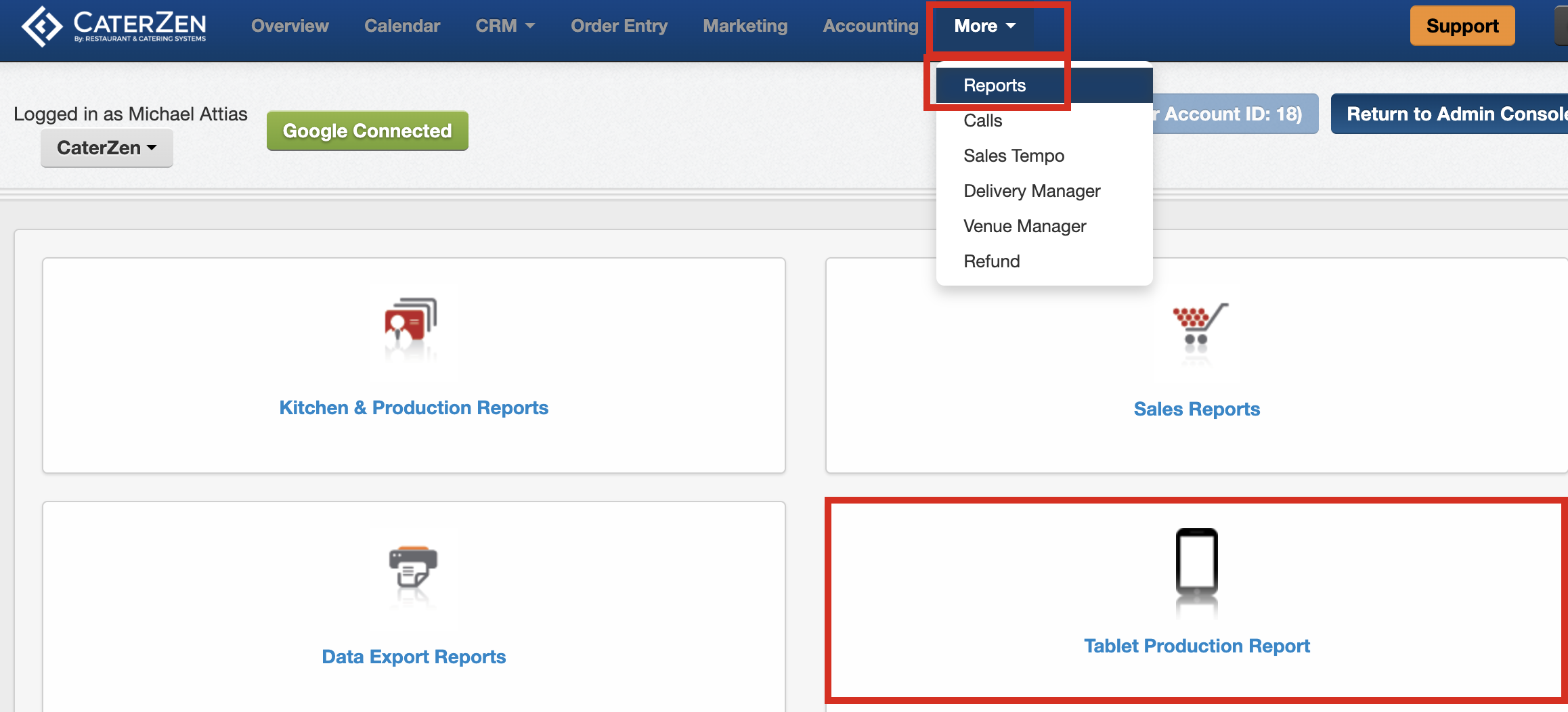
The SI button and open menu item totals are already active - no settings change needed.
Have questions or want help setting any of this up? Reach out to our support team, or check out our support article for a full walkthrough.
Not a CaterZen customer yet?
If your kitchen is still running on paper production sheets - or a system that wasn't built for the way catering actually works - we'd love to show you what our Catering KDS can do.
Start a free trial or book a demo with our team.
One missed special instruction. One custom item that didn't make it into the bag. One customer who doesn't rebook. That's the real cost of a kitchen running without the right systems. These updates exist so that doesn't happen to you.