
Your lunch counter can be an endless source of free catering leads, and most restaurants never tap it. Office workers come in for lunch and leave, and you never learn where they work or who buys the food for their meetings.
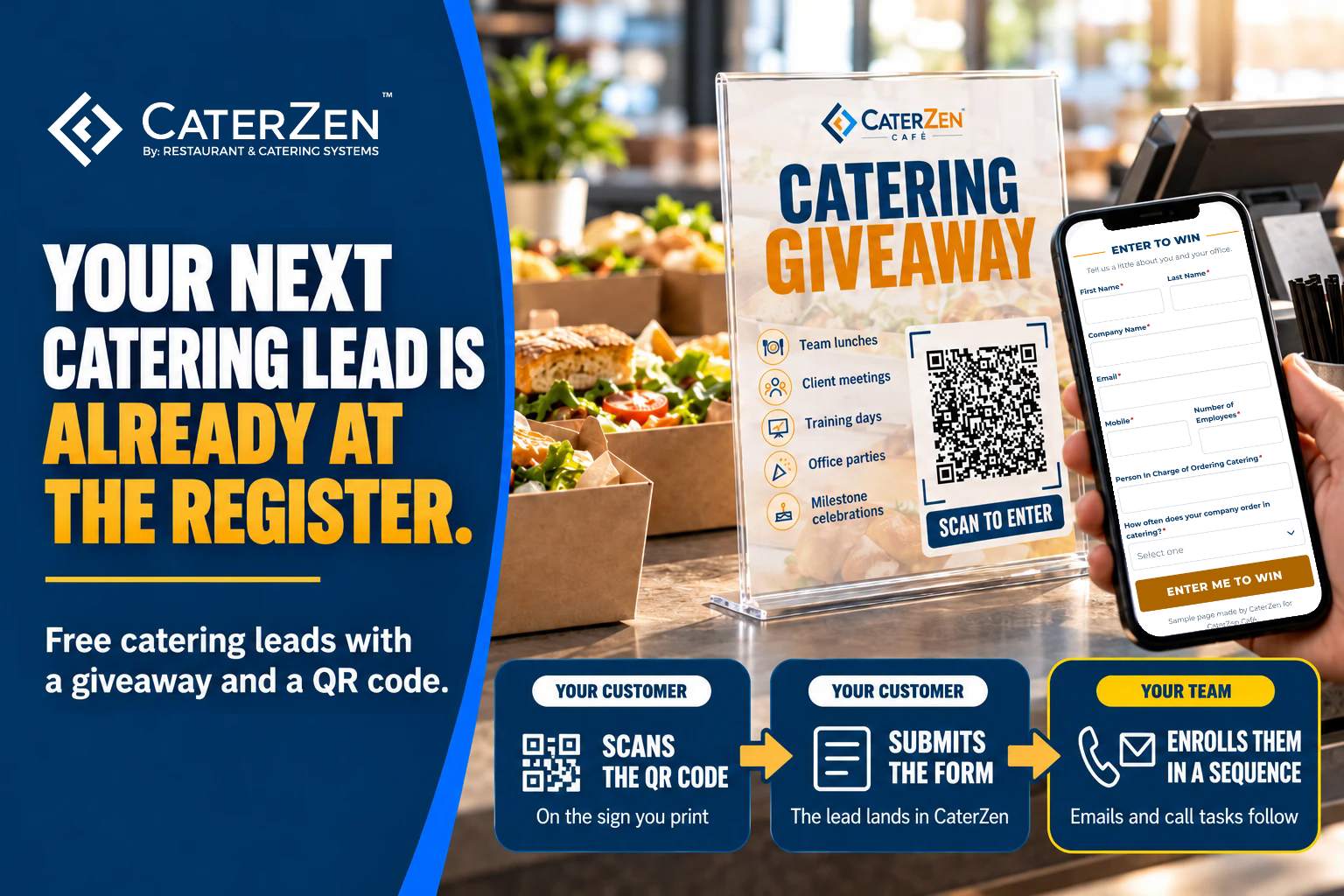
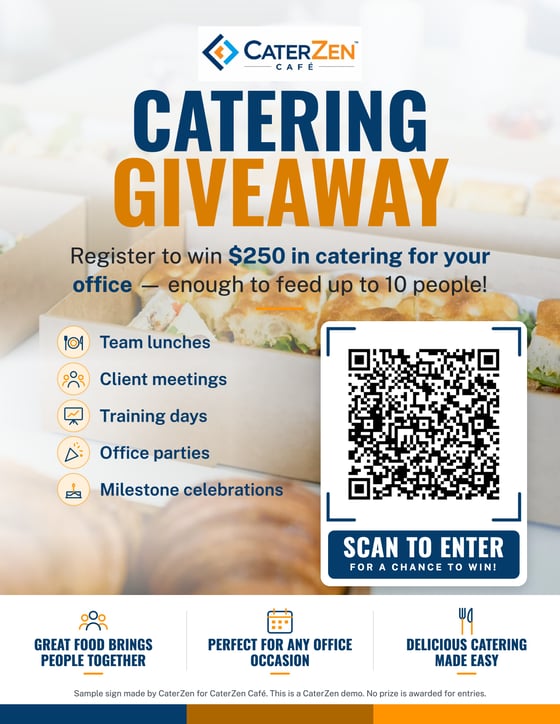
With a catering giveaway, a sign by the register invites customers to scan a QR code and enter to win catering for their office. The short entry form asks where they work, how big the office is, who orders the catering and how often.
Then the follow-up has to happen, for every entry. A sequence in CRM Sales Pro is a saved follow-up plan that runs on each new lead: emails from your rep's own Gmail and reminders to call, spaced out over the days that follow.
Want to see how this works? We created a CaterZen Café giveaway so you can experience the entire process yourself! Scan the QR code below, enter your information, and see exactly what your customers receive.
Scan the sign and enter the CaterZen Café giveaway
Reading on your phone? Enter the CaterZen Café giveaway.
This is a demo, and no prize is awarded. Enter with your real email and mobile number, because that's where the follow-up goes. You'll get a thank-you email right away. On the next business day, someone on our sales team enrolls you in a short sequence of emails and a phone call, the same follow-up your team can run with CRM Sales Pro.
How does a catering giveaway bring in free catering leads?
A catering giveaway trades the chance at a free office lunch for a few answers. Customers who already know your food scan a QR code at your counter and fill in a short form about their office and who orders its catering. Each entry becomes a contact in your CRM, and a follow-up sequence makes sure your team reaches every one.
Leads you buy from a list or an ad cost money, and many of those people have never tasted your food. Giveaway entries cost you a printed sign and one catered lunch, and the people entering are standing in your restaurant.
We have set up catering giveaways for clients for more than ten years, with a qualifying questionnaire in place of a fishbowl of business cards. The questions still do the work. An office of 80 that orders lunch every week is a very different lead from a group of six that orders once a year, and the form tells your rep which one just entered.
How each part of the catering giveaway works
1. The sign and QR code at your counter
Put the sign where people wait, such as by the register and at the pickup shelf. The QR code opens the giveaway page on the customer's phone, so there is nothing to type into a tablet and no slip to hand back. The sign also lists the occasions you cater (team lunches, client meetings, training days, office parties and milestone celebrations), so every customer who reads it learns that you cater for offices.
2. The short entry form
The entry form asks for:
- First and last name
- Company name
- Email and mobile number
- Number of employees
- The person in charge of ordering catering
- How often the company orders in catering, from multiple times a week to not at all
The last three answers are the ones your rep needs. They show whether this is a five-person office that orders twice a year or a 200-person company that orders every week, and whether the person who entered places the orders. If someone else does, you now have that name too.
Under the Enter button, one line tells entrants they agree to hear from you by email and phone, with a link to your privacy policy. Keep that line on yours.
3. The new contact in CRM Sales Pro
Each entry becomes a contact in your CaterZen CRM, with every answer saved on the record. A New Form Response email goes to the person you choose, with a link straight to that contact.
Today a rep enrolls each entry in the follow-up sequence by hand. It takes a few clicks from the contact record, or you can enroll a batch at once from a Marketing List.
4. The thank-you email
Right after entering, the customer lands on a page that says they're entered, and an automatic thank-you email follows within a minute. You write that email once, in the lead form's settings. Use it to confirm the entry and introduce your catering.
5. The follow-up sequence
The sequence keeps every entry from going cold. Each email step sends from the rep's own Gmail, only on the days and hours you set, and each call step puts a call on the rep's task list on the right day. A call step holds the sequence: the next email waits until the rep marks that call done, and its wait counts from that moment. Every sequence email carries an opt-out link. Once the sender has set up the forwarding step under Google Integration, a reply unenrolls the contact, so nobody gets an automated email in the middle of a real conversation.
A giveaway sequence can be short. Here is one that fits most restaurants:
- Email, right away. Thanks for entering, a link to your catering menu, and when the drawing happens.
- Call task, 2 business days later. Introduce yourself and ask which meetings and events their office feeds.
- Email, 3 business days later. How a standing order or a house account works for an office their size.
- Call task, 3 business days later. Ask for the date of their next catered meeting.
For the full how-to, with seven ready-made sequences and six email templates, read Catering Follow-Up Sequences and Templates in CRM Sales Pro.
6. The rep's call
Email keeps you in front of them. The phone closes the sale. When a call step comes due, it shows up on the rep's task list with your notes for the call. The rep calls from the contact record with CaterZen's built-in calling, which runs on your own Twilio account, and logs how the call went.
The rep doesn't call cold. They already know the company, the office size, who orders and how often, so the first question can be about the next event. In the demo, that call comes to you from our sales team.
Haven't entered yet? Enter the CaterZen Café giveaway and watch for the thank-you email.
Can I run a catering giveaway at my restaurant today?
Yes. The follow-up side is live in CaterZen today: lead forms put each entry in your CRM and send the thank-you email, and CRM Sales Pro runs the sequence and the calls. Giveaway pages and table signs made for your own restaurant, with your own QR code, are coming soon to CRM Sales Pro.
Frequently asked questions
Is the CaterZen Café giveaway a real contest?
No. CaterZen Café is a demo, and no prize is awarded. It lets you see the entry form, the thank-you email and the follow-up from your customer's side. Enter with your real email and mobile number, since that's where the follow-up goes.
Should my restaurant's catering giveaway have a real prize?
Yes. Pick a winner and cater lunch for their office, so a room full of people who eat at work get to taste your food. Write short rules covering who can enter, when the giveaway ends and what the prize is, and check your state's rules for giveaways before you start.
Are giveaway entries enrolled in a sequence automatically?
No. A rep enrolls each new entry, either one at a time from the contact record or as a batch from a Marketing List. It takes a few clicks and gives the rep a chance to read the entry first.
What happens when a lead replies to a sequence email?
The reply lands in the rep's Gmail inbox, and the rep answers personally. Once the sender has set up the forwarding step under Google Integration, CaterZen sees the reply and unenrolls the contact, so no more automated emails go out.
Do I need CRM Sales Pro to run a catering giveaway?
You need it for the follow-up. Sequences, email templates and calling are part of CRM Sales Pro, which is priced per location with unlimited users. Each team member who works the leads needs a seat assigned.
Turn your lunch customers into catering clients
"CaterZen has helped us find the customer, take their order easily, follow up with them and stay in front of them throughout the years without a single piece of paper or a pen. In fact, my catering sales have increased by 36%!"
Len Ruggiero, Mother Mary’s
Want this running at your counter? Book a walkthrough of CRM Sales Pro. We'll show you the giveaway follow-up on a live account and help you build your first giveaway sequence.
Your lunch customers already like your food. Ask them where they work.