Quick question: how many people ordered holiday catering from you last year, and how many of them have ordered again this year?
If you're like most operators this time of year, you don't have time to find out. The phone won't stop ringing and the turkey count keeps climbing.
The easiest holiday order you'll take this year comes from somebody who ordered from you last year. They already know your food. They trusted you with their family dinner or their company party, and they're planning again right now, whether you call them or not.
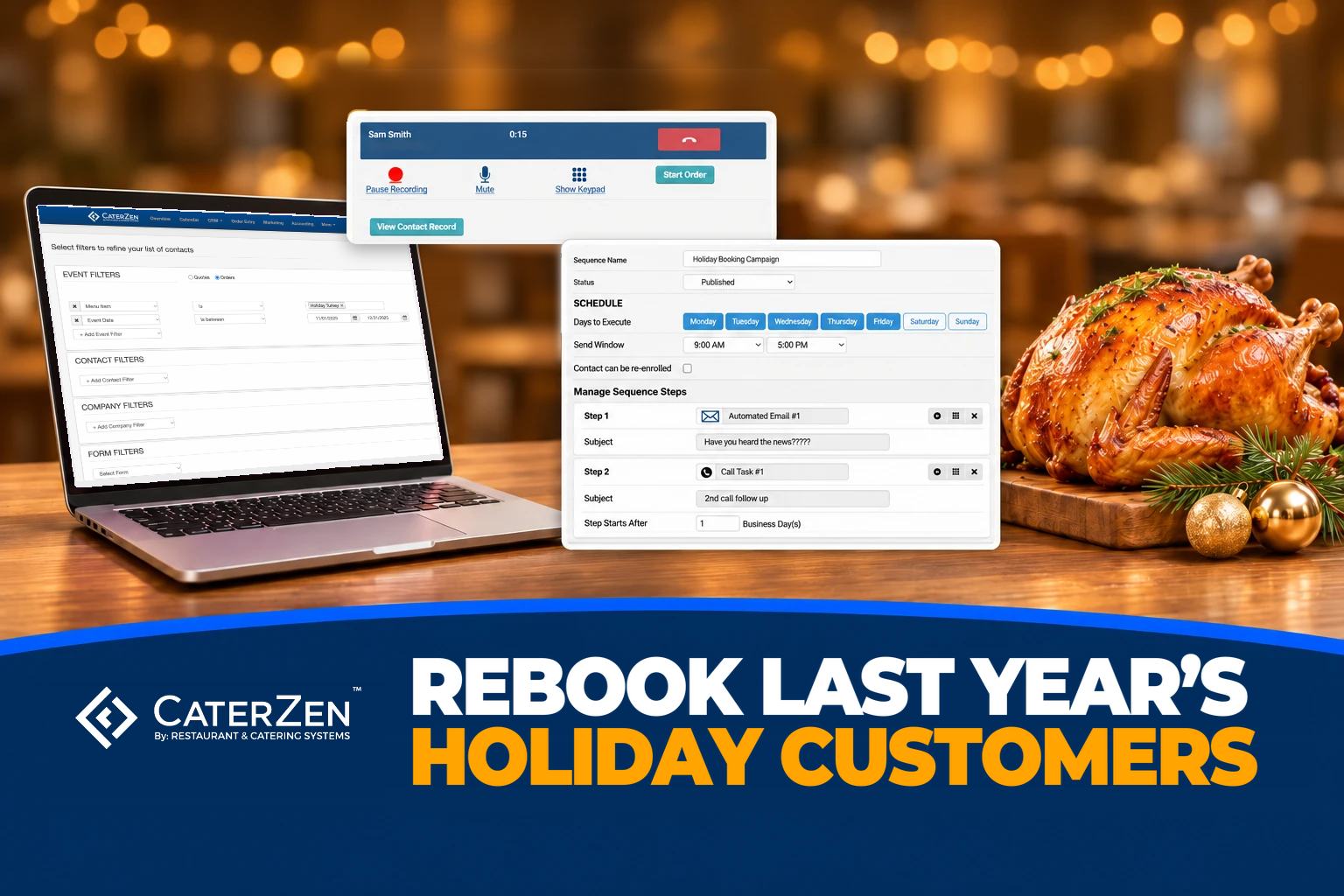
This post walks through one plan for those customers in CRM Sales Pro, start to finish: the list, the email, the calls, the thank-you, and the setup that sends next year's holiday email in October while you're still planning the menu.
Already on CRM Sales Pro? Everything below is under the CRM menu in your admin. Not on it yet? Book a walkthrough and we'll show you this plan on a live account.
Who should get your holiday catering email first?
Last year's holiday customers who haven't ordered yet this year. They're the warmest list you have in November and December, and every day you wait gives another caterer a chance to reach them first. Start there before you spend a dollar on ads.
Then pick out the handful who spent the most. Those customers get a phone call.
How do I find everyone who ordered holiday catering last year?
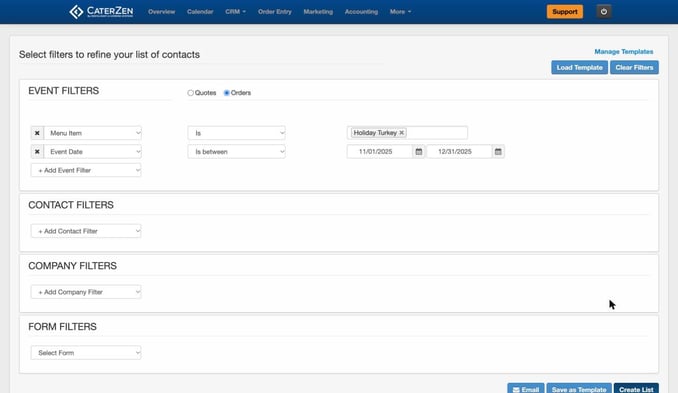
Build a Marketing List in CRM Sales Pro. Choose Orders, pick your holiday menu item, and set the event date to last year's holiday season. CaterZen pulls every customer who ordered it.
- Open Marketing Lists and, under Event Filters, choose Orders.
- Pick your holiday Menu Item: the smoked turkey, the holiday ham, the party tray, whatever you sell this time of year. Use the item names from your own menu.
- Set the Event Date to last season, for example November 1 to December 31, 2025.
- To leave out anyone who has already ordered from you since this year's holiday menu opened, add Most Recent Order is before that date. Any order counts, not only a holiday one.
- Click Save as Template and give it a name you'll find next year, like "Holiday Buyers."
Sell more than one holiday item? Pick them all in the same Menu Item filter. CaterZen finds everyone who ordered any of them.
One catch: a saved template keeps the dates you picked. Next year, change them to the new season before you run it.
Turn your biggest holiday customers into a call list
Add Order Subtotal to at least your big-order number, say $500. Because it sits on the same order as the menu item and the date, you get the customers whose holiday order alone hit that number.
Select them and click Create Call Task. CaterZen makes one task per contact, assigned to the rep you choose, with a due date. Cold calling sucks. These people ordered from you last year.
Should I send a campaign or a sequence?
Send a campaign to the big list and run a sequence for the short list. A campaign is one bulk email to everyone on a Marketing List. A sequence is a series of emails and call tasks for each contact, sent from the rep's own Gmail, and it's built for the customers worth a personal touch.
| Campaign | Sequence | |
|---|---|---|
| What it is | One bulk email to a Marketing List | Emails, call tasks and to-dos for each contact, on a schedule |
| Best for | Everyone who ordered your holiday menu | Your biggest holiday customers and party bookers |
| Good to know | Send it or queue it right from the list | Up to 250 new enrollments per user, and 250 sequence emails per sender, in any 24 hours |
Got 600 turkey customers? That's a campaign. Got 25 companies that booked a holiday party with you last year? That's a sequence.
The campaign email
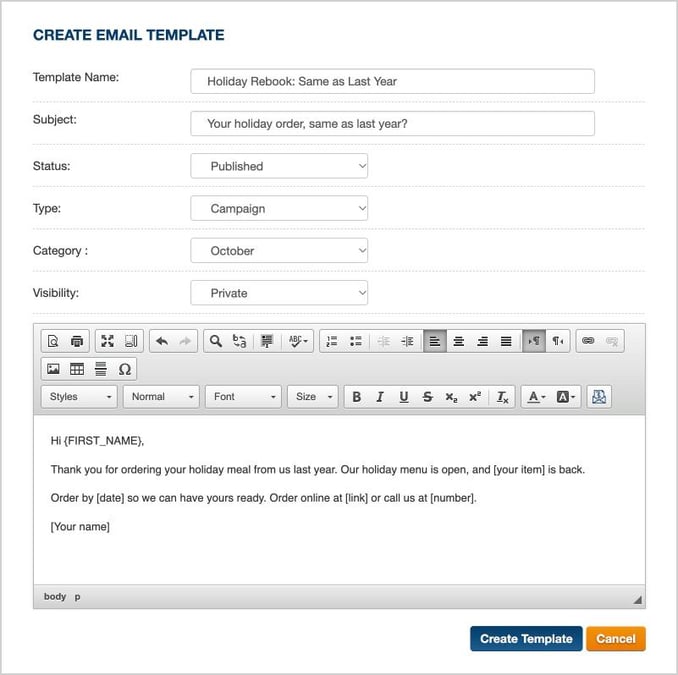
Write it once, short and specific. Use the mail merge options in the campaign editor to drop in each customer's first name.
Subject: Your holiday order, same as last year?
Hi [first name],
Thank you for ordering your holiday meal from us last year. Our holiday menu is open, and [your item] is back.
Order by [date] so we can have yours ready. Order online at [link] or call us at [number].
[Your name]
Then save it as a template. In Email Templates, choose Type Campaign and set the Category to the month you'll send it next year, like October. The Category list runs January through December, so next fall the email is sitting there waiting for you.
Want a hand building it? Book a walkthrough and we'll set up your Holiday Buyers list and your first holiday campaign with you.
A short sequence for your biggest holiday customers
Enroll when: now, for customers who booked a holiday party or a large holiday order with you last year and haven't booked this year. Use the Enroll in Sequence button on your list. Goal: their date on your calendar.
- Email, right away. "Holding a date for your holiday party?"
- Call task, 2 business days later. Offer last year's menu and headcount, or something new.
- Email, 3 business days later. A last call for preferred dates. Only say dates are filling if they are.
Keep it short during the rush. A call step waits for your rep to mark the call done, and the wait for the next email starts from then. If nobody gets to the calls, the sequence stops there.
Starting earlier next year? The longer early-booking version is in Catering Follow-Up Sequences and Templates in CRM Sales Pro.
What should my team do when a holiday customer calls?
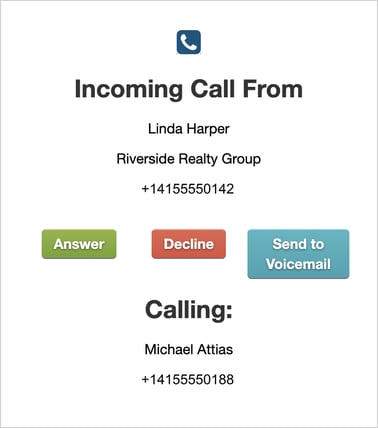
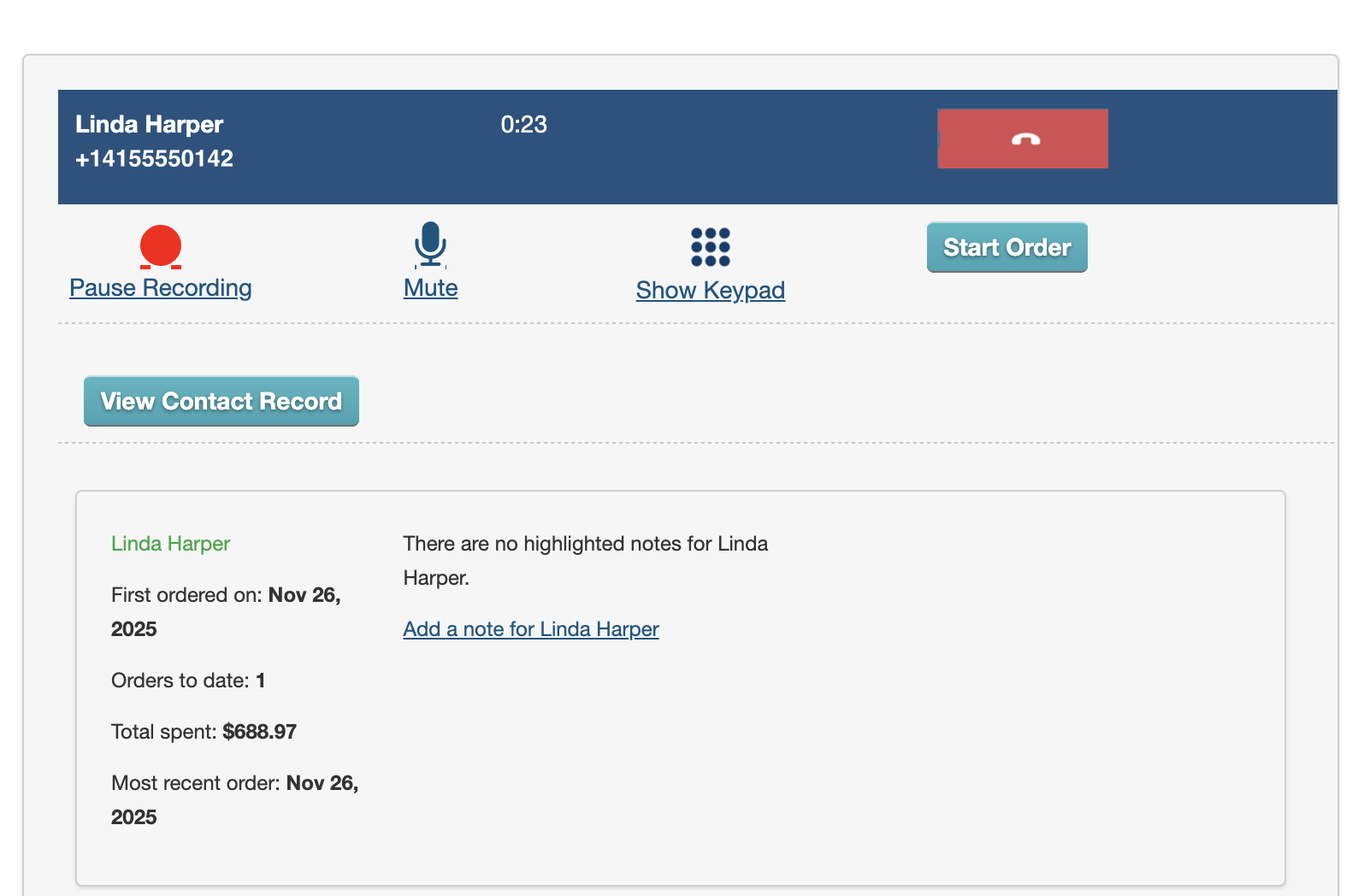
Answer by name, with the customer’s history in front of you. When a call comes in, CRM Sales Pro shows your rep who’s calling and which company they’re with before they pick up. Once your rep answers, the caller’s order history stays on screen while you talk, including how many orders they’ve placed and how much they’ve spent.
That's the difference between "Catering, can I help you?" and "Hi Linda, are we doing the smoked turkey again?"
Two habits make the rush easier.
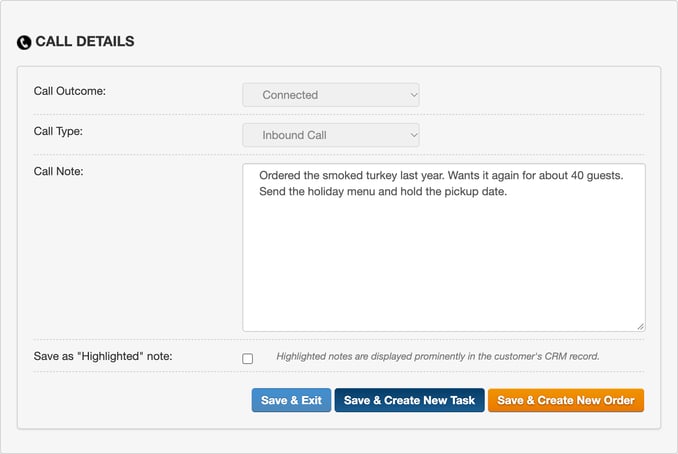
Type notes during the call. When it ends, CaterZen asks for the outcome and files the call on the contact. Nobody has to remember to log it.
Make outcomes that fit the season. Your team can add its own call outcomes, like "Holiday Order Placed" and "Call Back in January." In January, filter your Task List by that outcome, and there's your call list.
You'll hear "call me back after the holidays" a lot this month. Now it goes somewhere other than a legal pad.
How do I thank holiday customers after the rush?
Send one thank-you campaign the week after the holiday to everyone who ordered from this year's holiday menu. Add a link to a short survey with two questions: what did we get right, and what should we change?
Use your Holiday Buyers template, change the dates to this season, and skim the names before you send. If someone's order didn't happen, take them off. A thank-you for a meal you never served is a bad look.
Years ago I told my newsletter readers that the gift certificates you sell this time of year help with your January sales. If you sell gift cards, mention them in this email.
For the companies that booked a holiday party, go one step further with a short thank-you sequence:
- Email, right away. Thank them and ask how the party went.
- Call task, 3 business days later. Ask what's coming up in January: kickoff meetings, trainings, client lunches.
- Email, 4 business days later. Offer a standing order or a house account for the new year.
How do I set up next year's holiday catering marketing now?
Save what you built this season, and put one reminder on your calendar for October 1. Next year your holiday marketing takes a few clicks, and it goes out before the planning starts.
When I ran my restaurant, I kept a tickler file for exactly this. It was a folder marked January through December, with a note to call the customer before the planning started. I wrote about it in our Marketing Lists post. This is the same idea, except the email is already written.
Here's the October version:
- Open your Holiday Buyers template, change the dates to this season, and run it.
- Open your holiday campaign template from the October category, update the menu and the order-by date, and send it.
- Duplicate this year's holiday sequence, update the emails, publish it, and enroll your biggest customers. A sequence locks once contacts are enrolled, so a copy is how you change it.
- Create call tasks for anyone worth a personal call.
You're scrambling this year. Next year, the email goes out in October and the orders come to you.
Could you do this without software?
Sure. Pull last year's tickets, build a spreadsheet, write the emails, hand out call sheets, and remember to do it all again next October. You can do this manually... but why?
CaterZen's catering software just makes it simple. The list rebuilds itself, the emails are saved, and the calls land on the right rep's task list.
Frequently asked questions
Can I send a holiday sequence to hundreds of customers at once?
Each user can enroll up to 250 new contacts in a rolling 24 hours, and each sender can send up to 250 sequence emails in a rolling 24 hours. For a big holiday list, send a campaign to everyone and save the sequence for your top customers.
Can a customer be in my holiday sequence and another sequence at the same time?
No. A contact can only be in one sequence at a time. If a customer is already in a win-back sequence, let it finish or unenroll them before you add them to the holiday one.
What happens when a customer replies to a holiday sequence email?
The reply lands in the rep's Gmail inbox, and the rep answers personally. Once the sender has set up the forwarding step under Google Integration, CaterZen sees the reply and takes the contact out of the sequence, so no more automated emails go out.
Do I need CRM Sales Pro for this?
Yes. Marketing Lists, Sequences, Email Templates and calling are part of CRM Sales Pro, priced per location with unlimited users. Calling runs on your own Twilio account. Book a walkthrough for today's price.
Start with one list this week
Don't build all of this before Thanksgiving. Build the Holiday Buyers list, send one campaign to the people who haven't ordered yet, and create call tasks for your top ten.
Then see who picks up.
Doris Italian Market & Bakery builds its Thanksgiving packages in CaterZen. Co-Owner Gary Mulé put it this way:
"CaterZen Software has allowed us to create consistency in service and also increase the trust."
Gary Mulé, Co-Owner of Doris Italian Market & Bakery
Read how Doris runs holiday packages and large events across its stores.
Already a CaterZen client? Book a walkthrough and we'll help you build your Holiday Buyers list and your first holiday campaign before the rush peaks.
New to CaterZen? Start your free 30-day trial and get the ordering and customer history this whole plan runs on.