Two catering operations on the same street. Both running CaterZen's catering software. Walk into their offices and you'd swear they were running different software.
That's not an accident. That's the point.
Here's something I learned a long time ago: every catering business looks normal from the outside. But once you sit down with the owner, you find out they've got their own way of taking orders, their own way of pricing, their own way of talking to customers. The guy down the street calls it "delivery." You call it "drop-off." Your wedding clients want a printed timeline; his corporate clients just want a confirmation email.
There is no silver bullet, and there is no one-size-fits-all catering software. The best you can hope for is a system that gets out of your way and lets you run your business — not somebody else's idea of how a catering business should run.
That's what I built CaterZen to do.
What You Get on Day One
Before I get into the customization, let me be straight with you. CaterZen out of the box is already a real catering business in a box. You can take orders, build menus, set up online ordering, run delivery, send quotes, generate invoices, accept payments, and keep up with your customers. Most operators are live and taking orders within a few days of signing up.
If you never touched another setting, you'd still have a serious system.
But that's not what this post is about.
The Real Power: Bending It to Your Business
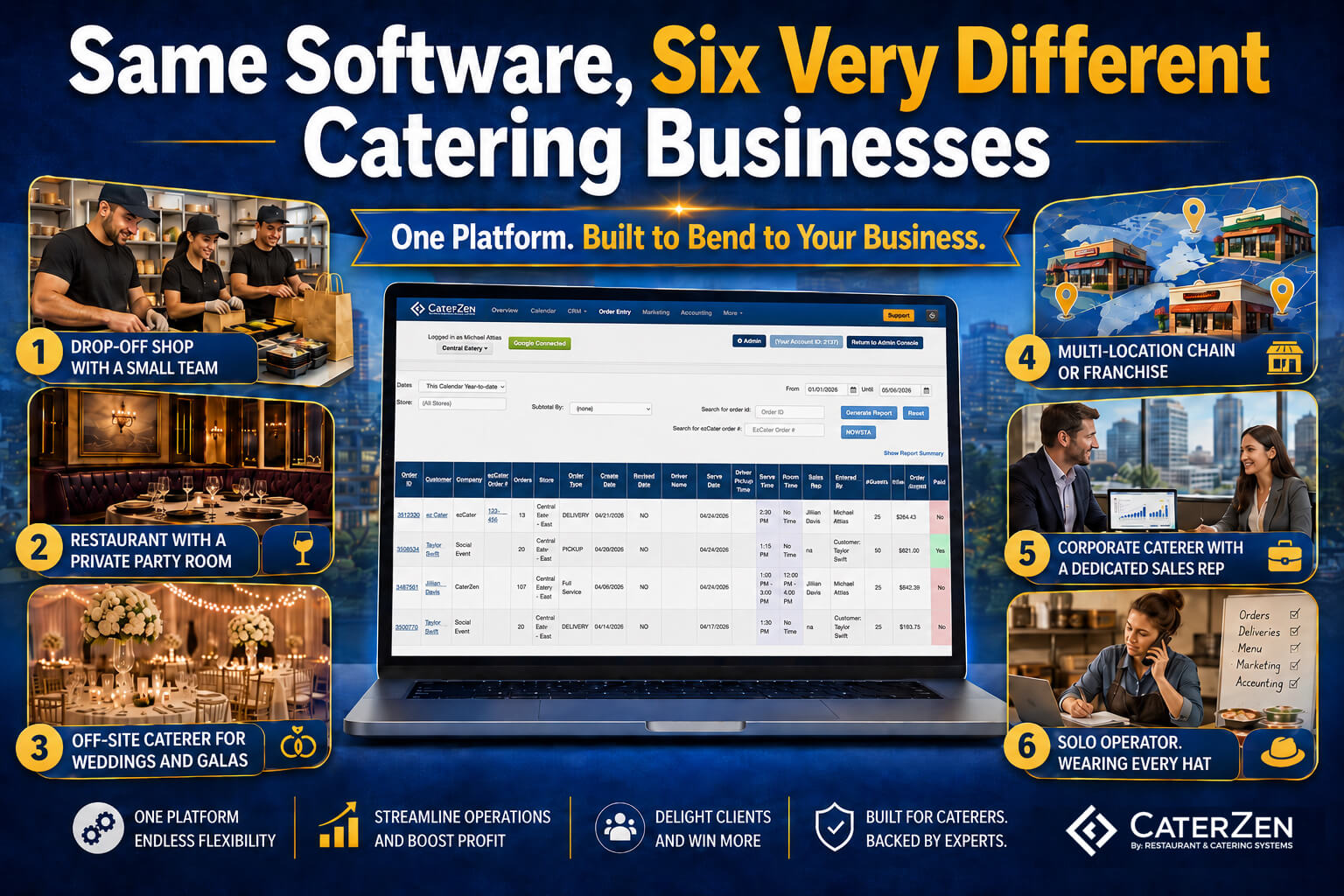
Below are six different kinds of catering operations I see using CaterZen. Same software. Six completely different setups. The point isn't to brag about features. The point is that wherever you fit on this list - or somewhere in between - there's a configuration to make the system work the way you work.
1. The Drop-Off Shop with a Small Team
You're a restaurant. Catering is a real chunk of the business - sometimes most of it. You've got two or three people total, and on a busy Friday you're running phones, the line, and the catering board all at once.
Here's how this kind of operator usually sets up CaterZen:
They go straight into Custom Labels and rename "Delivery" to "Drop-Off" — because that's what their customers call it.
They set up Custom Order Types for "Corporate Lunch," "Construction Site," and "Pharm Rep Lunch," each with its own color on the calendar so you can see at a glance what the day looks like.
They configure the upsell module so every order taker is prompted to ask about drinks and desserts on every single order.
They set holiday menus to auto-toggle on November 1st and off January 5th - set it once, walk away.
And they configure the email templates to fire automatically every time an order is placed, confirmed, or changed, so the customer always hears something without anyone having to remember.
What they leave untouched: BEO templates, staffing positions, electronic contracts. They don't need any of it. And that's fine. CaterZen doesn't punish you for not using a feature.
Sound familiar? Read how Deep Run Roadhouse went from Excel sheets and manual emails to running a high-volume drop-off operation - with the Delivery Manager as their centerpiece.
2. The Restaurant with a Private Party Room
You're running a restaurant and booking a party room for showers, corporate dinners, and milestone birthdays. Two different businesses living under one roof.
This operator builds a Custom Order Type called "Private Event" with its own rules attached: the calendar shows it in a color you can spot from across the room, and they configure CaterZen to pre-authorize the customer's credit card three days before every event - so nobody gets a surprise decline on the day of the party.
The "Private Event" order type gets its own custom checkout field ("Room Booked") that only shows up on those orders.
And across all their orders, they've added global custom fields for AV needs, decoration package, and final headcount due date - questions they want answered on every ticket, regardless of order type.
They use the serve-end-time and room-end-time fields, but they rename them to "Event Start" and "Room Vacate" using Custom Labels - because nobody on their staff says "serve end time."
For pricing, they configure headcount-based add-ons. Linens at two bucks a guest. Rental chairs at three. The math runs itself instead of somebody figuring it out on a calculator. Item minimums make sure nobody books a thirty-person event with two trays of food.
3. The Off-Site Caterer Doing Weddings and Galas
No restaurant. No retail side. Just events - weddings, fundraisers, corporate galas, the kind of stuff that costs five figures and lives or dies on the details.
The customization story here is about making the system match the complexity of the work. These operators build custom BEO templates from scratch - adding the client's place setting photo, the venue map, a minute-by-minute timeline, and a staffing section with positions they've created themselves ("Lead Captain," "Bartender," "Setup Crew").
They configure their own quote cover sheets with their branding, their terms, and their testimonials.
They set up electronic contracts that attach to quotes so clients can sign without printing anything.
They configure their online ordering customer portal to match the brand of their website, and their unique menu.
They also set up the rental items category with their own inventory - linens, tables, glassware, chair covers - so every event tracks non-food line items the same way it tracks food.
See this profile in action: At Your Service Catering - owner Michael Leake has run a full-time off-premise catering and catering hall operation on CaterZen for 15 years. Contract attachments and order history are his bread and butter.
4. The Multi-Location Chain or Franchise
Three locations or more. Maybe a regional kitchen and three storefronts. Maybe ten franchisees who all need to look like one brand on the outside but run their own books on the inside.
The configuration story for this operator is about control at every level. Each location is set up with its own delivery zones, its own delivery method default, and its own notification recipients - the Nashville store's order doesn't fire texts to the Memphis manager.
Tiered Menu Pricing keeps pricing centralized on the menu, but each location can be configured to override what matters locally - taxes, fees, specific item prices. The four permission levels (Reporting, Accounting, Restaurant Manager, Marketing) are assigned per staff member per location - the Memphis manager sees Memphis, the Nashville manager sees Nashville, and the owner sees everything.
For enterprise-scale operations, the Phone Center Ordering Tool lets a centralized call center take orders on behalf of multiple locations, routing each order to the right store automatically. And Segmentation by Region means marketing campaigns and reporting can be filtered by geography - so you're not staring at one big undifferentiated number when you're trying to figure out why the downtown location is outperforming the suburbs.
On the customer side, the store locator is configured and live on the online ordering portal, showing each customer their closest locations sorted by proximity - so they're always picking from the nearest options first.
5. The Corporate Caterer with a Dedicated Sales Rep
This operator's customer base is fifty big corporate accounts, not five thousand walk-ins. The whole game is account management, and everything in the setup reflects that.
They configure Account Representatives so every customer is assigned to a specific salesperson, with commission tracking running automatically in the background.
They build customer-specific menus so Acme Corp logs into the online ordering portal and sees only Acme's contracted prices and Acme's curated menu - not the public one. House accounts are configured with net-30 terms, and the AR aging email automation is set up to chase unpaid invoices on a schedule without anyone having to remember. Tax-exempt status is flagged on each qualifying account once - churches, schools, government clients - and they're never taxed again.
For prospecting, the setup includes custom lead forms on the website that route inquiries straight into the CRM, and a book-a-meeting page so prospects can schedule a call without the back-and-forth. Customer notes and highlighted notes are configured as a discipline - the salesperson walks into every meeting with the client's allergies, the last event that went sideways, and the budget cap from last quarter already on screen.
This is a fundamentally different configuration than #1. Same software.
Cabo Bob's runs this way - a Director of Operations managing corporate accounts across multiple locations, using CaterZen to target pharmaceutical reps, universities, and IT sector businesses with campaigns and holiday reminders, and to pull up any client's full order history the moment they call.
6. The Solo Operator Wearing Every Hat
Owner. Sales. Bookkeeper. Marketing. Sometimes the cook. Sometimes the driver. You know who you are.
The customization story here is different from every other profile. It's not about building out complex configurations - it's about investing a few hours up front to set the right defaults, so the system runs on autopilot while you focus on actually running the business.
They configure all the automated email templates once - order confirmation, quote, change, cancellation, sales receipt, order reminder - and never touch them again. They set the loyalty program rules - earning rate, redemption thresholds, certificate expiration - once, turn on customer self-service so clients manage their own points, and walk away. Recurring orders are configured for regulars: every Tuesday, the law firm gets the same lunch, the card gets pre-authorized a few days out, and nobody has to make a phone call. Blackout dates are set in advance so customers can't book when the kitchen is closed.
The point isn't fewer features. It's configuring the automation correctly once so the software handles the follow-up, the confirmations, and the reminders that would otherwise fall through the cracks when you're the only one in the building.
Brunswick Catering owner Isalin Howard tells this story well — she was buried in manual invoicing and Excel before CaterZen. Now she converts a quote to an invoice in one click and spends the time she saved actually running her business.
A Few Power-User Configurations Worth Knowing About
Even if none of the six profiles above were a perfect match for you, here are a handful of less obvious customizations worth setting up:
- Staff-only custom fields. Configure a field on the order that the customer never sees — only the driver, the kitchen, or the manager. Gate codes, parking notes, the security guard's name.
- Polygon delivery zones with priority overlap. Draw a "downtown surge" zone over the top of your regular zone, set it to higher priority, and downtown orders automatically pay more without you doing the math.
- Pre-authorize cards a few days before delivery. Configure the pre-auth window so funds are locked before event day - a declined card on Saturday morning never becomes a five-alarm fire.
- Per-order-type calendar colors. Set weddings to red, drop-offs to blue, corporate lunches to green. You can read your entire week at a glance without opening a single order.
- Custom styling on the customer portal. Override anything visual. Match your website. Don't let the software dictate your brand.
- Automated email templates for every trigger. Configure them once for confirmation, quote sent, order change, cancellation, sales receipt, AR aging, and order reminder. Forget about it.
The Bottom Line
Nothing replaces selling. Nothing replaces good food and showing up on time. Software won't fix a broken business, and there's no silver bullet that makes catering customers come running.
But once you've got the food and the service handled, the right software - configured the right way for your operation - keeps you out of the weeds long enough to actually go sell. CaterZen is built so the drop-off shop, the wedding caterer, the multi-location chain, and the solo operator can all configure their version of the business without fighting a tool that wasn't built for them.
Same software. Six very different catering businesses. Yours, however you run it.
If you want to see what your version of CaterZen looks like, start a free trial and poke around for yourself. If you'd rather have somebody walk you through it, book a demo and we'll show you how operators like you have it set up.
Either way - there's no silver bullet. But there's a system that bends to fit you. And that's a real start.